 Saypad
Hold fn and talk. Your words appear where you type.
Free voice dictation for Mac that runs entirely on your device. Every recording is saved with its audio, so nothing you say ever gets lost.
The typed message is real Saypad output: a 9-second sentence, transcribed on-device by Whisper in 2.2 seconds, unedited.
Works anywhere you can type
You speak faster than you type.
Typical rates for an average typist and conversational speech.
Three steps. No app to open.
01Click into any text field
Saypad waits in the menu bar. Any field you can paste into works.
02Hold fn and speak
Talk naturally. Double-tap fn to go hands-free, tap again to stop.
03Let go. The text is there.
Saypad pastes it where your cursor was, then checks that it actually landed.
Gets your jargon right. Better than the speech recognition built into your Mac.
Let's sync with Priya about the Kubernates migration and the Q3OKRs, then push the hot fix to staging before the demo on Friday.
Let's sync with Priya about the Kubernetes migration and the Q3 OKRs, then push the hotfix to staging before the demo on Friday.
Same 7.6-second recording on the same Mac (M4 Pro, synthetic voice, October 2026). Built into macOS = Apple's on-device speech engine in macOS 26. Saypad = Whisper large-v3-turbo, kept warm.
Built so nothing you say gets lost.

Every dictation is saved with its audio
Text, length, language, engine and where it was pasted. Play it back, copy it again, search it later. Even cancelled recordings are kept.
It tells you if the paste worked
Most dictation apps fire ⌘V and hope. Saypad reads the field back. If the text didn't land, it says so and keeps it one click away.


Works the moment it's installed
Whisper is built in, with a light model inside the 187 MB download, so your first dictation already has punctuation. The larger, more accurate model downloads in the background on Wi-Fi, and Saypad switches to it on its own. Nothing to install, no terminal.
Everything you need. Nothing you don't.
Hands-free mode
Double-tap fn and keep talking. Tap fn again when you're done.
Punctuation included
Commas, periods and capitals appear on their own. No need to say “comma”.
Picks the language
Whisper hears whether you're speaking English or Russian. No switching.
Writes what you said
No AI rewrite, no tone filter. Your words, cleanly typed.
Paste check
Saypad reads the field back and tells you if the text didn't land.
History with audio
Every dictation is saved with its recording. Search it, replay it, copy it again.
Your own vocabulary
Add names and jargon so they're spelled right, and set fixes like “kubernetes” → “Kubernetes”.
Works offline
Recognition runs on your Mac. No internet needed after setup.
Lives in your menu bar. Out of your way.
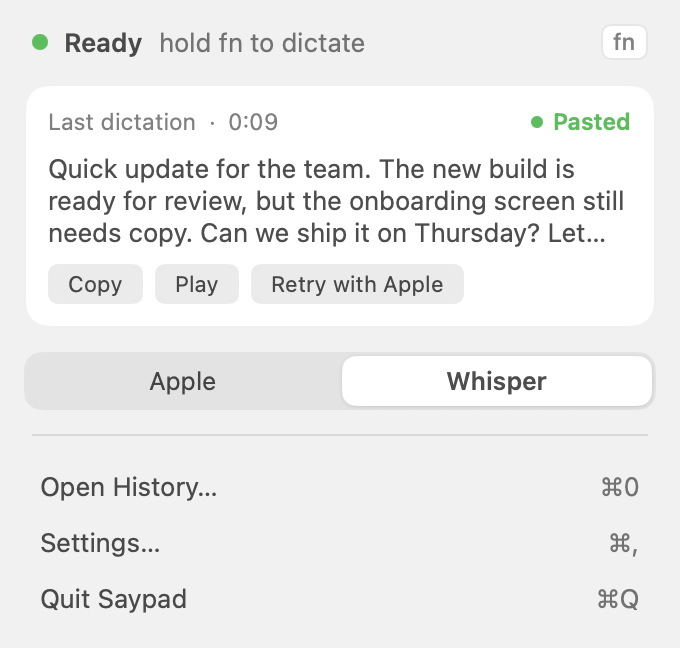
Your last dictation, one click away
Copy it again, play it back, or pick a model for the next one, without opening a window.
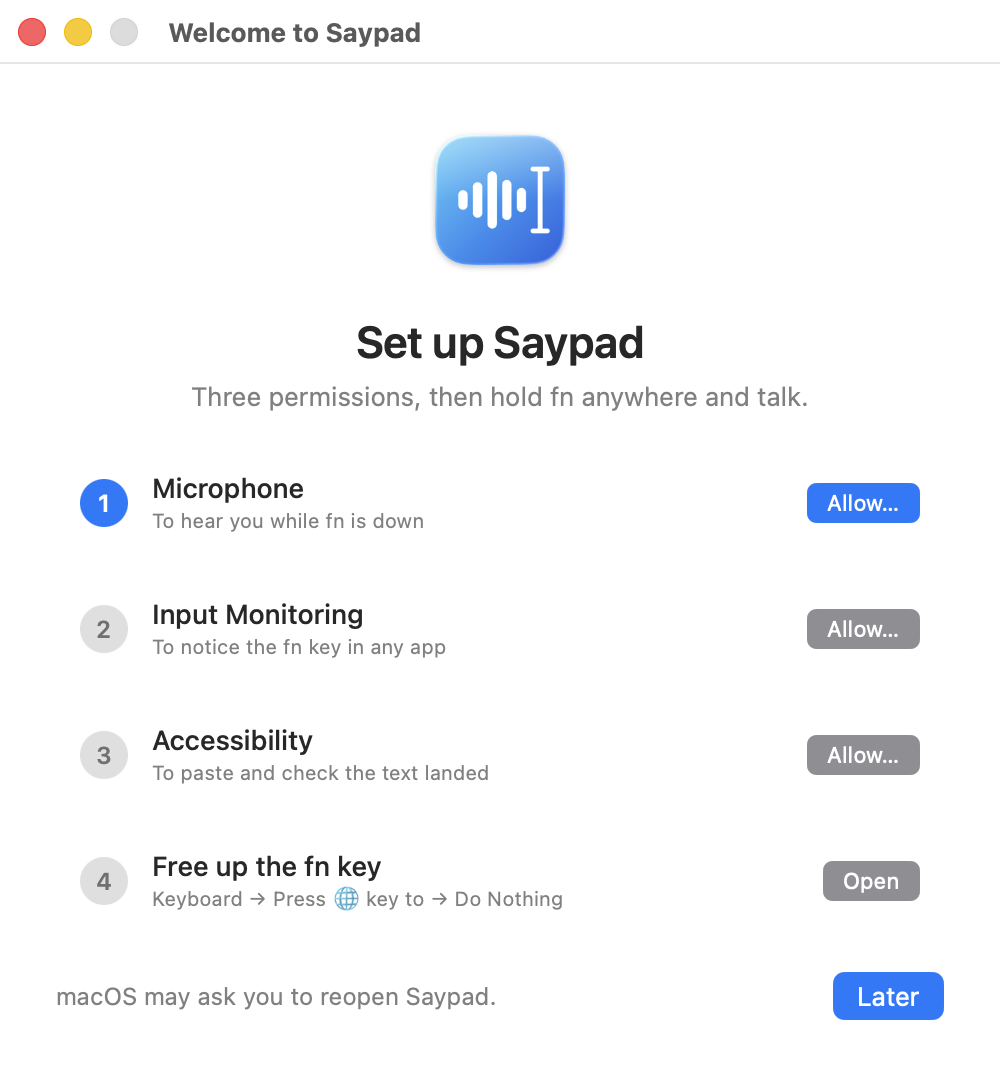
Set up in a minute
Three macOS permissions and one keyboard setting, with a live checkmark for each step.
Your voice never leaves your Mac.
Speech is recognized on your device. The internet is only used once, to fetch the larger model in the background.
On-device recognition
Whisper runs locally on your Mac's GPU, and so does Apple speech on macOS 26. No server sees your audio.
No account, no keys
Nothing to sign up for, no API keys to paste, no subscription to cancel.
Your files, on your disk
Recordings and transcripts live in one folder you control.
~/Library/Application Support/FnFlow How Saypad compares.
| Saypad | Wispr Flow | Superwhisper | TAWK | |
|---|---|---|---|---|
| Price | Free | $15 / month | $8.49 / month or lifetime | $99 once |
| Free usage | Unlimited | 2,000 words / week | 3,000-word trial, then a free tier | 500-word trial |
| Speech processed | On your Mac | In the cloud | On your Mac or in the cloud | On your Mac |
| Rewrites your words | No | Yes | Optional | No |
Based on each product's website and reviews, September 2026. Prices may have changed.
Saypad is new. Be one of the first.
You won't find a wall of reviews here yet. We'd rather show real ones later than invent them now. Try it on your own words and tell us what to fix.
Free. The whole app.
No tiers, no word counter, no trial that runs out.
- Unlimited dictation
- Whisper built in, Apple speech on macOS 26
- History with audio, retry and search
- Paste check after every dictation
- Light and dark, follows your Mac
Questions
Is Saypad really free?
Yes. Everything runs on your Mac, so there are no server costs to pass on and no reason to count your words.
Does it clean up or rewrite what I say?
No. Whisper adds punctuation and capital letters, but the words are yours. Saypad types what you said.
What happens if the paste doesn't go through?
The text stays in your history and the recording pill shows "In history · ⌘V". Copy it with one click. The audio is saved too, so you can run it again.
Which languages are supported?
English and Russian are tested. Whisper detects the language on its own; with Apple speech you pick it in settings.
Is the app in English?
Yes. The interface is in English, with Russian built in. It follows your Mac's language, or you can pick one in Settings.
Which Macs does it run on?
Any Mac with Apple Silicon (M1 or newer) on macOS 15 Sequoia or later. On macOS 26 you also get Apple's on-device speech engine as a second option.
Is it notarized by Apple?
Not yet. On first launch macOS will ask you to confirm that you want to open it.
Do I need to set up Whisper?
No. Whisper and a light model come inside the app, so it works right after install. The larger model (1.6 GB) downloads in the background on Wi-Fi; you can pause it or start it yourself in Settings → Recognition.